

Have you ever felt frustrated when your article never appeared in Google’s AI overview answers?
Getting noticed by Google’s AI overview starts with a simple trick: keep your page neat and your writing lively. Arrange your ideas in a clear layout, so they stand out. Write simple, straight-to-the-point sentences that your readers will enjoy and that Google will pick up easily.
In this article, you will learn how to make your content stand out by using engaging headings and adding structured data that guides both readers and search engines.
By the end, you will know how to get your content noticed, keep your readers interested, and secure that prime AI overview spot.
What Is Google’s AI Overview?

When you search for a question on Google, you may see a special AI-powered summary at the top of the results page. That is Google’s AI overview. It uses artificial intelligence to scan top-ranking pages and present a concise answer box.
Why does it matter? Google’s AI overview drives massive visibility because it sits above regular search results. Securing that spot can dramatically increase clicks and authority for your brand.
Insight: Many guides stop at the definition. Here, you’ll learn exactly which content elements AI scans and how to tailor yours for that top‐of‐page placement.
Action steps
- Review current AI overview snippets for your focus topic.
- Map out how that snippet is structured (number of sentences, use of lists, presence of numbers or statistics).
- Update your content’s opening lines to match that format, ensuring you answer the query within the first 40–50 words.
Why Optimizing for AI Overview Matters
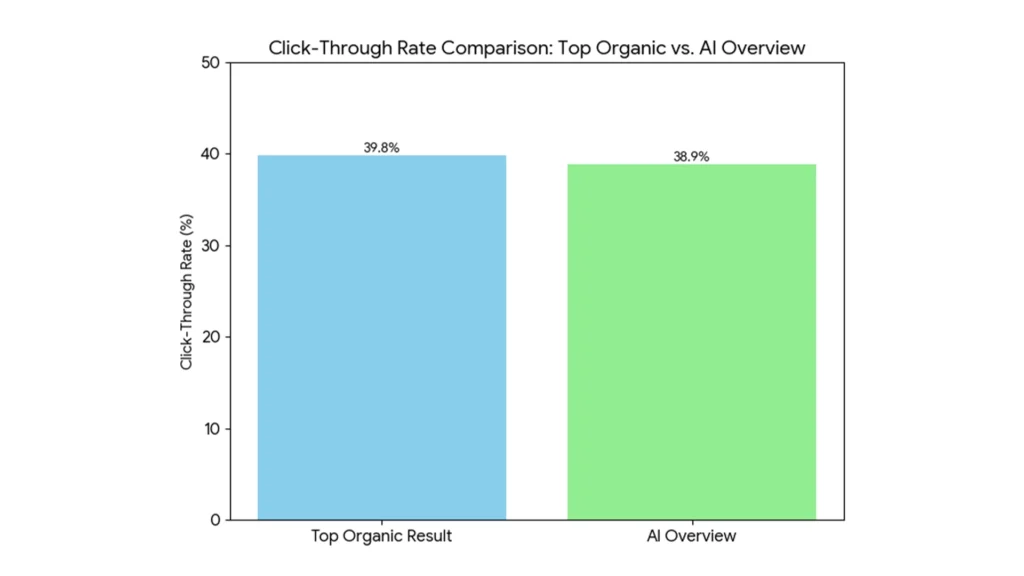
When your content earns the AI overview spot, it sits above all organic results, much like a featured snippet, so it captures maximum attention and clicks.
In 2020, roughly 65 percent of global Google searches ended without a click because answers appeared directly on the results page. By targeting the AI overview, you reclaim that visibility and drive traffic back to your site.
Key Benefits
- Higher click-through rate: Appearing in the featured snippet spot can drive significantly higher click-through rates compared to the second organic result.
- Authority boost: Being the source of a concise answer positions your brand as a trusted expert
- Better user experience: Immediate answers build trust and reduce bounce rates
Reminder: Even if users do not click through, owning the AI overview builds brand awareness, and repeat searchers are more likely to visit your site next time.
Action Steps
- Audit current placements by searching your primary keyword and noting who holds the AI overview box now.
- Set improvement goals to match or exceed the answer length (usually 40 to 60 words) and style of the current overview.
- Track performance using Google Search Console to monitor impressions and click-through rates for pages optimized for AI overview.
Understand User Intent and Search Queries
To optimize content for an AI overview, you must first understand what users really want when they search your target keyword.
Google groups queries into three main intent types:
- Informational
Seeking knowledge or a direct answer.
People come to Google when they want to learn something or get a straight answer. If someone types “What is AI overview?” They are simply looking for a clear explanation or definition. Start your content with that definition and then add the key details readers need.
- Navigational
Looking for a specific website or page.
These searches include brand or site names, for example, “Prolific Logic AI overview guide.” Readers expect your page or tool link right away. Make sure you include the brand or product name in the heading and opening lines.
- Transactional
Ready to take action, such as signing up or purchasing.
Queries like “optimize content for AI overview service” signal that the user is prepared to hire help or buy a tool. Provide a brief list of steps or a call to action with a link or form.
Why does it matter? Aligning your content to the correct intent type signals to Google’s AI that your page will best satisfy the user’s needs. When your format and tone match intent precisely, the AI overview is far more likely to feature your content.
Insight: If you write an in-depth explainer for a query that expects a download link, AI overview will choose a page that delivers that link instead.
Steps for Matching Search Intent
Want to pinpoint exactly what your audience is searching for? Use this quick checklist to match every section of your content to real user intent:
| Your To-Dos | Details |
| Classify top queries by intent | Open Google’s People Also Ask and note how related questions are phrased.In Keyword Planner, look at the search terms report and tag each query as informational, navigational, or transactional. |
| Tailor your headings to match the intent | For informational intent, use headings like “What Is…” or “How Does…” For navigational intent, include your brand or tool name in the heading. For transactional intent, use action-oriented headings such as “Get Started With…” or “Buy…” |
| Format your answers to satisfy each intent | Informational: Begin with a concise definition (1–2 sentences), then expand with a short list or one example. Navigational: Provide a clear link or button near the top, followed by a brief description of what users will find there. Transactional: Outline the purchase or signup steps in a numbered list and include a prominent call to action link or form field. |
Pro Tip: Keep this checklist handy whenever you plan your content so you match user intent and boost your chances of earning an AI overview spot.
Use Natural, Conversational Language
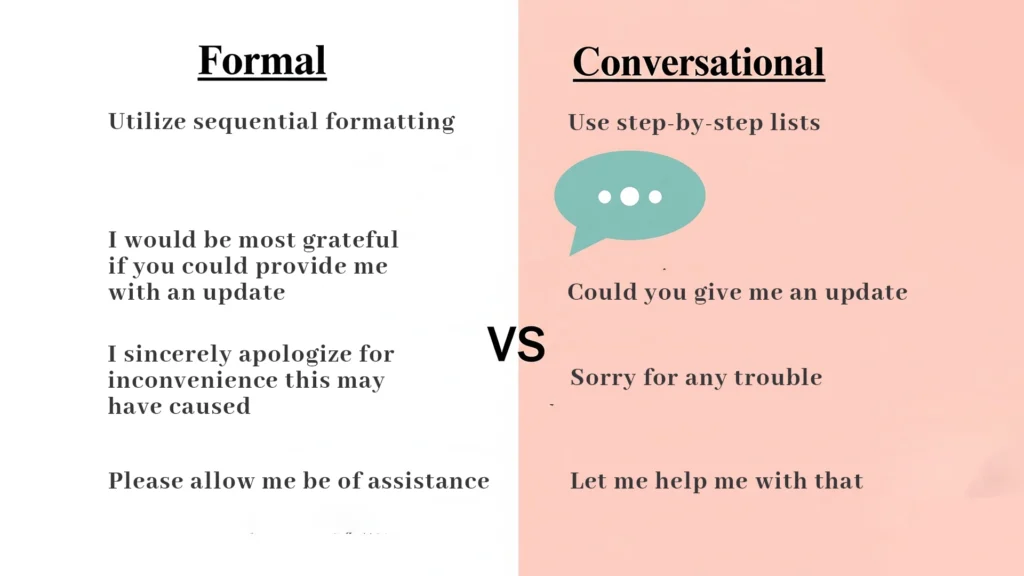
AI overview favors content that reads like a helpful conversation rather than a stiff instruction manual. Writing in a friendly tone keeps readers engaged and makes it easier for AI to identify key points.
Why it matters: Natural language signals clarity and relevance. When your sentences mirror how people speak, the AI can parse intent and context more accurately, boosting your chance of earning that overview spot.
Quick Note: Read your text aloud. If it sounds robotic, swap complex phrases for simple ones.
Getting Started
- Write like you speak: Avoid jargon or marketing fluff. Instead of “utilize sequential formatting,” say “use step-by-step lists.”
- Keep sentences short: Aim for 15–20 words per sentence so both readers and AI can process your message quickly.
- Use contractions sparingly: Contractions (like “you’re” or “we’ll”) add warmth, but overusing them can feel informal. Strike a balance.
- Ask rhetorical questions: Phrases like “Wondering how to start?” draw readers in and mirror their thought process.
Structure Your Content with Clear Headings
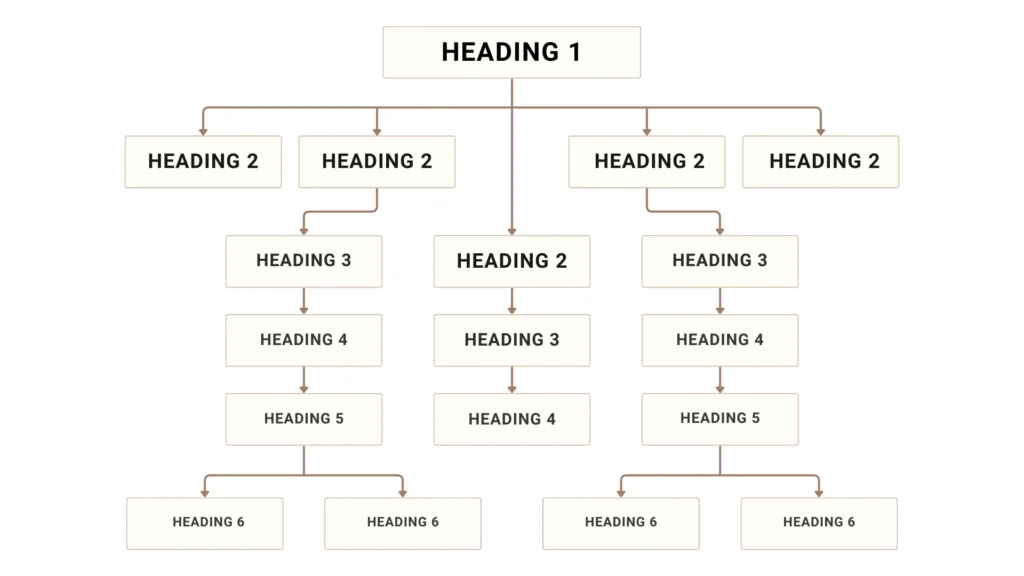
Breaking your article into distinct sections helps both readers and AI overviews grasp your message instantly. Use descriptive H2 and H3 headings that mirror user queries and guide skimming.
Follow These Guidelines
Logical Hierarchy
Organize your post so each big idea gets its own H2 heading, and the finer details are used in H3. For example, set “Understand User Intent” as an H2 and then list “Informational versus Transactional Queries” under it with an H3. This layout makes it easy for everyone to follow your content.
Keyword Placement
Include your primary keyword exactly once in an H2 heading. Placing “optimize content for AI overview” in a main heading sends a strong relevance signal without overdoing it.
Concise Headings
Aim for five to eight words per heading. Short headings are easier for AI to parse and for users to scan quickly, improving overall engagement.
Question Style
Turn some headings into questions to match user search patterns. For instance, use “What Does AI Overview Include?” when you want that section treated like a Q&A. Framing headings as questions aligns your content with how people phrase queries.
What You Gain: Clear headings act like signposts. AI scans them to map your content hierarchy and choose the most relevant section for the overview box. They also boost readability and encourage visitors to explore more of your page.
Heads Up: Skip vague labels like “More Info.” Opt for focused phrases such as “How AI Overview Works” or “Best Practices for Schema Markup.”
Enhance Trust with Authoritative Sources and E-E-A-T
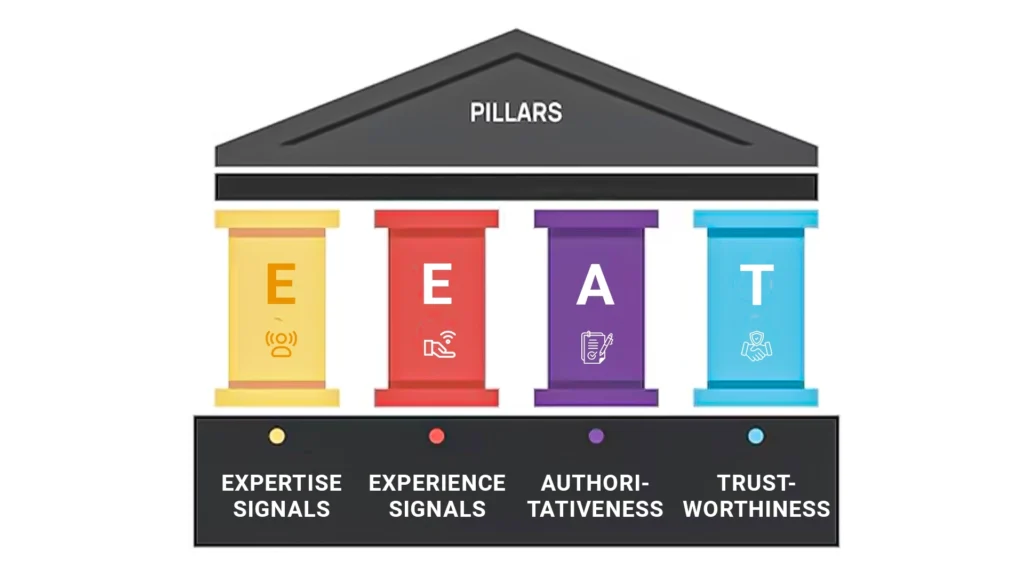
When Google’s AI checks your page for that coveted overview spot, it’s looking for proof that you really know your subject and that your information can be trusted.
Showing off your credentials, sharing real success stories, and linking to respected sources helps your readers and Google feel confident in your content.
Expertise Signals
Demonstrate your authority by showcasing real credentials and qualifications that matter to your audience. Describe certifications you hold, years of experience in AI overview optimization, or any published case studies that prove your deep understanding of the topic.
Tip: Highlight the credentials that your readers value most to reinforce your expertise.
Experience Signals
Showcase concrete results from your own work to build confidence. For example, share a brief success story such as “After applying our optimized heading structure one client saw a 30 percent increase in AI overview placements within four weeks,” to illustrate the real impact of your methods.
Reminder: Use specific metrics or short case summaries so readers see the value you provide.
Authoritativeness
Give your readers real confidence by pointing to sources they trust. Link to official guides, well-known technical docs, or respected academic research that directly backs up your points. When you show you have done the research, your audience and search engines will know they can rely on your advice.
Insight: Choose credible sources in your audience’s region to align with their expectations and boost your page’s authority.
Trustworthiness
Be open about where your numbers and facts come from. For example, say, “According to the latest search engine developer documentation from 2025” or “Based on our own study from June 2025.” This lets anyone, whether a reader or an algorithm, see exactly how you arrived at your conclusions.
Important: Always include dates and source names to signal the reliability and freshness of your content.
Key Takeaway: High E-E-A-T pages rank better in AI overviews because Google favors content backed by proven credentials and reliable data.
Add Structured Data for Better Understanding
Structured data helps search engines, and AI overview algorithms parse your content with precision. By embedding schema markup, you provide a clear map of your page’s key elements, such as questions, answers, steps, and reviews. That extra clarity often translates into richer search features and a stronger chance at the AI overview spot.
How to Implement Schema Markup?

First, choose the schema type that fits your content. If you are answering questions, use the FAQ schema. For step-by-step guides, select the HowTo schema. Each schema type has a defined JSON-LD structure that you paste into your page header or just before the closing body tag.
Next, populate the schema fields with your page’s content. For the FAQ schema, include the question text and the accepted answer exactly as they appear on the page. For the HowTo schema, list each step title and description in order. That one-to-one match ensures the AI overview picks up the correct information.
Finally, validate your markup using Google’s Rich Results Test. This free tool checks your JSON-LD for errors and shows you exactly how Google sees your structured data. Fix any warnings so your page meets Google’s requirements for rich results.
Reminder: Even a single misplaced comma can break your schema. Always run a validation test before publishing.
Use Lists, Tables, and Summaries for Clarity
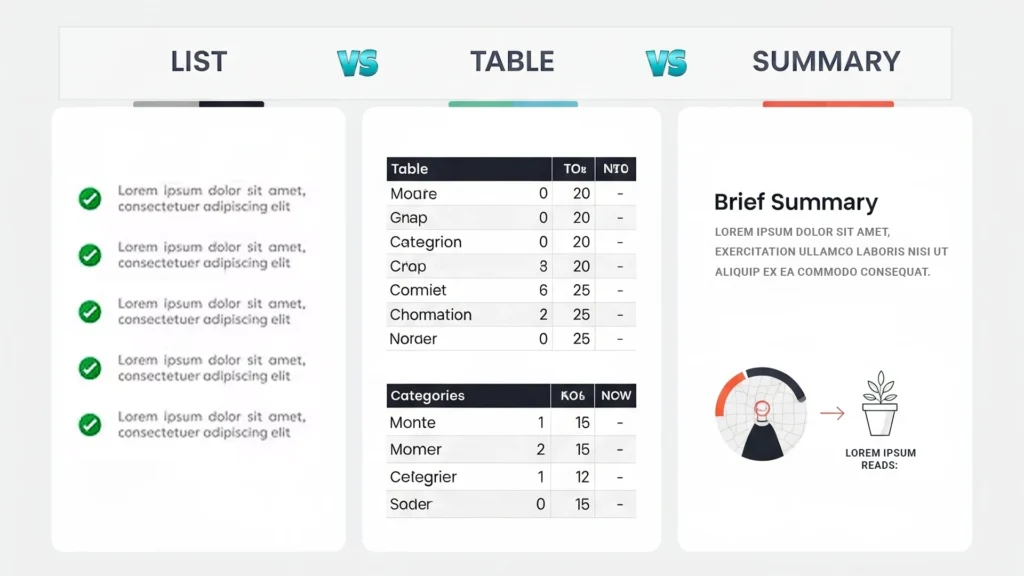
Presenting information in lists, tables, or brief summaries makes it easy for both readers and AI overview to digest key points at a glancey.
- Lists work well when you have multiple related items, such as steps, benefits, or features.
- Tables stand out when comparing options side by side.
- Summaries give a quick wrap-up for complex sections so readers can grasp the essentials before diving deeper.
When you use a bullet list, AI overview can extract each point cleanly and display it in its answer box. A comparison table helps highlight differences, such as before and after metrics or feature comparisons. And a short summary at the end of a section reinforces the main takeaway in one or two sentences.
Key Takeaway: Clear formatting not only improves readability but also increases the likelihood that the AI overview will recognize and feature your best content.
Internally Link to Related Content
Linking to your own relevant pages keeps readers exploring your site and helps AI overview understand your content network. Thoughtful internal links guide visitors to deeper resources while signaling to search engines which topics you cover in depth.
What’s in It for You: Internal links distribute SEO value across your site and increase time on the page. They also help AI overview algorithms see the broader context of your content, boosting your chances of featuring in related answer boxes.
Ready to Link?
First, pick two to four articles or guides on your site that dive deeper into the topic you’re covering. Next, use natural, descriptive text for your links so readers know exactly what they will find without resorting to exact keyword repeats.
For example, link “How to write conversational headings” to your detailed guide on creating engaging subheadings. Place links within the body where they provide extra value, not just at the end.
Insight: Aim for one internal link every 200 to 300 words so you create a clear content web without overwhelming the reader.
Conclusion
Want your content to land in Google’s AI overview? Keep it clean, organized, and reliable. Use simple headings that readers can spot, write like you are talking to a friend, and add structured data so search engines know what matters. Follow these steps, and you will claim that top spot and see more visitors on your site.
At Prolific Logic, we help brands implement these techniques seamlessly. If you want expert support or a free audit of your pages, we are here to help.
FAQs
Can I optimize content for an AI overview using simple headings only?
Yes. Using clear, descriptive headings is one of the easiest ways to optimize content for an AI overview. Just ensure your headings match user queries and include the focus keyword where it fits naturally.
Do I need structured data to optimize content for an AI overview?
Yes. Adding schema markup like FAQ or HowTo helps AI overview parse your page more accurately. Even a single validated JSON-LD snippet can boost your chances significantly.
Is conversational language really necessary to optimize content for an AI overview?
No. While conversational language improves readability and AI parsing, you can still win an AI overview spot with formal text if it is concise, well-structured, and matches user intent.
Will internal linking help optimize content for the AI overview?
Yes. Thoughtful internal links guide AI toward related sections and signal topic depth, which can improve your chances of capturing the AI overview placement.


